
Robotic Sir Blog
Interesting Robotics Projects for Beginners and Students
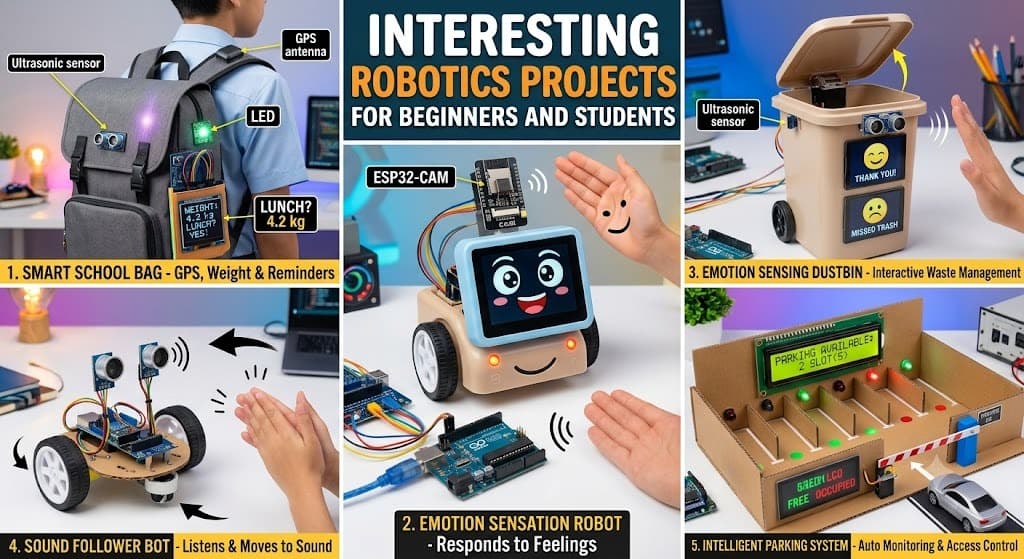
Robotics is one of the best ways for students to combine programming, electronics, sensors, and problem-solving in a practical project. You don't need to start with a complex humanoid robot or advanced artificial intelligence system.
Simple projects built with Arduino, ESP32, sensors, motors, displays, and basic programming can teach important robotics concepts while keeping the learning process fun.
In this guide, we explore five interesting robotics projects that beginners and students can build and gradually improve.
1. Smart School Bag
A Smart School Bag turns an ordinary school bag into an interactive electronics project. Depending on the features you add, the bag can provide security alerts, monitor its weight, detect movement, or even track its location.
This project is especially useful for students because it combines practical electronics with programming.
What Will You Learn?
Building a smart school bag can help you learn:
- Sensors and microcontrollers
- Basic Arduino or ESP32 programming
- Motion detection
- GPS-based location tracking
- Weight measurement
- LEDs and buzzer alerts
- Basic automation
You can start with a simple version and add more features as your skills improve.
Difficulty
The difficulty depends on the features you choose.
A basic version is suitable for beginners, while adding GPS tracking, weight measurement, multiple sensors, or wireless connectivity can make the project more suitable for intermediate-level students.
Estimated Cost
A basic version can cost approximately ₹800 to ₹2,500, depending on the components and features.
Advanced versions with GPS modules, additional sensors, or wireless connectivity may cost more.
Estimated Duration
A simple version can usually be completed in around 2 to 7 days, depending on your experience and the number of features you implement.
Components Required
Common components include:
- Arduino Uno, Arduino Nano, or ESP32
- Motion sensor
- GPS module
- Buzzer
- LEDs
- Jumper wires
- Battery or power bank
- Load cell for weight measurement
- Appropriate school bag
You do not need every component for the basic version. Start with one or two features and expand the project later.
Do You Need Arduino or Programming Knowledge?
Basic Arduino and programming knowledge is helpful but not mandatory.
Beginners can learn the required concepts while building the project. It is a good way to understand how software and electronics work together to solve a practical problem.
2. Emotion-Sensing Robot
An Emotion-Sensing Robot is an interactive robotics project designed to detect signals from a person and respond accordingly.
A simple version can react to touch, sound, or other sensor inputs, while a more advanced version can use a camera and artificial intelligence to recognize facial expressions.
For students interested in robotics and AI, this project provides an excellent opportunity to explore human-robot interaction.
What Will You Learn?
This project can introduce you to:
- Sensors
- Microcontrollers
- Sound detection
- Touch detection
- Servo motors
- LEDs
- Displays
- Decision-making logic
- Basic human-robot interaction
- Introduction to computer vision and AI
The robot can be programmed to respond differently depending on the input it receives.
For example, it could display a happy face when it detects a positive interaction or play a sound when it detects a particular input.
Difficulty
A basic emotion-reacting robot can be built by beginners using touch or sound sensors.
A more advanced version using a camera and AI-based facial-expression recognition is better suited to students who already have some programming and electronics experience.
Estimated Cost
A basic version can cost approximately ₹800 to ₹2,500.
Adding a camera, display, or AI-based recognition features can increase the cost to around ₹3,000 or more, depending on the hardware.
Estimated Duration
A basic version can be completed in approximately 2 to 5 days.
A camera-based version with speech or facial-expression recognition may take a week or longer.
Components Required
Depending on your design, you can use:
- Arduino Uno or ESP32
- Sound sensor or microphone module
- Touch sensor
- Buzzer
- RGB LED
- OLED display
- Servo motors
- Jumper wires
- Battery
- ESP32-CAM or another camera module for advanced versions
Do You Need Arduino or Programming Knowledge?
You do not need to be an expert.
Basic knowledge of Arduino, sensors, and programming will make the project easier, but beginners can start with a simple sensor-based version and gradually add more advanced features.
3. Emotion-Sensing Smart Dustbin
A Smart Dustbin is a popular beginner robotics project because it combines sensors, automation, and a useful real-world application.
You can make the project more creative by adding an emotion display.
Instead of simply opening its lid automatically, the dustbin can show different expressions or play sounds depending on how it is used.
For example, the display could show a happy face when someone uses the dustbin correctly or display a different expression when the bin becomes full.
What Will You Learn?
This project can teach you about:
- Ultrasonic sensors
- Servo motors
- OLED displays
- LEDs
- Buzzers
- Microcontrollers
- Sensor-based automation
- Basic programming
- Distance measurement
It is an excellent project for understanding how a sensor can trigger an automatic response.
Difficulty
The basic automatic dustbin is suitable for beginners.
You can increase the difficulty by adding:
- Animated facial expressions
- Sound effects
- Garbage-level monitoring
- Multiple sensors
- Wi-Fi monitoring
- Mobile notifications
Estimated Cost
A basic version can typically be built for approximately ₹500 to ₹1,500.
An advanced version with an OLED display, multiple sensors, and wireless features may cost more.
Estimated Duration
A simple version can be completed in approximately 1 to 3 days.
An advanced version with animations, sound effects, and additional sensors may take around 3 to 5 days.
Components Required
Common components include:
- Arduino Uno, Nano, or ESP32
- Ultrasonic sensor
- Servo motor
- OLED display or LEDs
- Buzzer
- Jumper wires
- Resistors
- Breadboard
- Suitable dustbin or container
- Power source
The ultrasonic sensor detects when a hand is near the dustbin and the servo motor can automatically open the lid.
A second sensor can be used to estimate how full the dustbin is.
Do You Need Arduino or Programming Knowledge?
You do not need advanced programming skills.
A basic understanding of Arduino is useful, but beginners can learn the necessary concepts while building the project.
The project becomes particularly interesting when students experiment with their own expressions, sounds, and sensor-based reactions.
4. Sound Follower Robot
A Sound Follower Robot is an interesting project that allows a robot to move toward the source of a sound.
Instead of being controlled entirely using a remote, the robot uses microphones or sound sensors to detect a clap, whistle, or other loud sound and determine its approximate direction.
This makes the robot feel more interactive because it can respond to its environment.
What Will You Learn?
Building a sound follower robot can help you understand:
- Sound sensors
- Microphones
- Motor drivers
- DC motors
- Microcontrollers
- Sensor comparison
- Decision-making logic
- Robot movement
- Basic autonomous robotics
Multiple sound sensors can be positioned around the robot so that the controller can compare the detected sound levels and decide which direction to move.
Difficulty
This is a beginner-to-intermediate robotics project.
The basic version is relatively straightforward, while accurate sound-direction detection requires more careful sensor placement, programming, and testing.
Estimated Cost
A basic version can cost approximately ₹700 to ₹1,800, depending on the motors, chassis, controller, and sound sensors used.
Estimated Duration
A basic version can generally be completed in around 2 to 5 days.
Students who are new to robotics may need additional time for wiring, calibration, and testing.
Components Required
Typical components include:
- Arduino Uno or ESP32
- Two or three sound or microphone sensor modules
- BO motors or DC gear motors
- L298N motor driver
- Robot chassis
- Wheels
- Buzzer
- Battery
- Jumper wires
- Switch
- Optional LEDs or OLED display
The sensors can be positioned at different locations on the robot so the controller can compare the detected sound levels.
Do You Need Arduino or Programming Knowledge?
You don't need to be an expert programmer.
Basic Arduino and programming knowledge is helpful, especially for motor control and sensor processing.
A good approach is to start with simple motor movement and sound detection before attempting more accurate sound-direction tracking.
5. Intelligent Parking System
A Smart Parking System is a practical robotics and automation project that automatically detects whether parking spaces are occupied or available.
Instead of manually checking each parking space, sensors can detect vehicles and display the availability of each slot.
The project is useful for learning how robotics and automation can solve real-world problems.
What Will You Learn?
This project can teach you:
- Ultrasonic or infrared sensors
- Microcontrollers
- Servo motors
- LCD or OLED displays
- LEDs
- Sensor-based decision making
- Automatic barriers
- Basic automation
- Embedded programming
You can start with a single parking space and gradually expand the system to multiple slots.
Difficulty
A basic single-slot parking system is suitable for beginners.
The project becomes more advanced when you add:
- Multiple parking spaces
- Automatic entry gates
- RFID access
- Wi-Fi monitoring
- Mobile applications
- Real-time parking availability
- Cloud-based monitoring
Estimated Cost
A simple model can usually be built for approximately ₹700 to ₹2,000.
Additional sensors, RFID modules, displays, or wireless monitoring can increase the overall cost.
Estimated Duration
A basic working model can generally be completed in 1 to 3 days.
A multi-slot system with automated gates and wireless monitoring may take approximately 4 to 7 days, depending on your experience.
Components Required
Common components include:
- Arduino Uno, Nano, or ESP32
- IR or ultrasonic sensors
- Servo motor
- 16x2 I2C LCD or OLED display
- LEDs
- Buzzer
- Jumper wires
- Resistors
- Breadboard
- Power source
For advanced versions, you can add:
- RFID module
- Multiple sensors
- ESP32
- Wi-Fi connectivity
The sensors detect vehicles, the microcontroller processes the information, and the display shows the available parking spaces.
Do You Need Arduino or Programming Knowledge?
You don't need to be an expert programmer.
Beginners can learn basic sensor connections, Arduino programming, and servo control while building the project.
This project is especially useful because it demonstrates how sensors and motors can work together to create an automated solution to a real-world problem.
Which Robotics Project Should You Start With?
If you are completely new to robotics, start with a project that uses a small number of components and simple programming.
| Project | Difficulty | Approx. Cost | Approx. Duration |
|---|---|---|---|
| Smart School Bag | Beginner–Intermediate | ₹800–₹2,500 | 2–7 days |
| Emotion-Sensing Robot | Beginner–Intermediate | ₹800–₹3,000+ | 2–7+ days |
| Emotion-Sensing Smart Dustbin | Beginner | ₹500–₹1,500+ | 1–5 days |
| Sound Follower Robot | Beginner–Intermediate | ₹700–₹1,800 | 2–5 days |
| Intelligent Parking System | Beginner–Intermediate | ₹700–₹2,000+ | 1–7 days |
For absolute beginners, the Smart Dustbin or Intelligent Parking System is a good starting point.
Students who want to explore more advanced concepts can move toward the Emotion-Sensing Robot or Sound Follower Robot.
How to Make These Projects More Advanced
Once the basic version works, don't immediately start another project. Instead, try improving the existing one.
You can add:
- ESP32 and Wi-Fi connectivity
- Mobile app control
- OLED or LCD displays
- Voice commands
- IoT dashboards
- Data logging
- Bluetooth communication
- Artificial intelligence
- Computer vision
- Cloud monitoring
- Multiple sensors
- Automatic alerts
This approach helps you move from simply assembling components to actually designing and engineering a robotics system.
Final Thoughts
Robotics projects are most valuable when you use them to understand why something works, not simply when you make a circuit work once.
Start with a simple version, understand every component, write your own code, test different conditions, and then add new features.
Whether you are a school student, college student, beginner programmer, or robotics enthusiast, these projects can help you develop practical skills in electronics, programming, automation, and robotics.
Keep experimenting, document your projects, and don't be afraid to break your first prototype. Every failed test is another opportunity to learn.
Want to learn more robotics projects? Explore the Robotic Sir Community for robotics, AI, programming, competitions, projects, and hands-on learning resources.